1. Obtaining and preparing species occurrence data
Source:vignettes/obtaining_data.Rmd
obtaining_data.RmdIntroduction
Species occurrence records are the foundation of biodiversity studies. However, working with multiple data sources (such as GBIF, SpeciesLink, BIEN, and iDigBio) presents two major challenges: data acquisition and format standardization. Each database uses different column names and structures, creating a potential problem for researchers.
Here, we will use as example the species Araucaria angustifolia, also known as the Paraná Pine. It is an emblematic coniferous tree native to the subtropical highlands of Brazil, Argentina, and Paraguay. Due to historical overexploitation and severe habitat loss, this species is currently classified as Critically Endangered (CR) by the IUCN Red List. Its conservation status makes accurate and comprehensive occurrence data crucial for ecological modeling, understanding population decline, and guiding reforestation efforts.
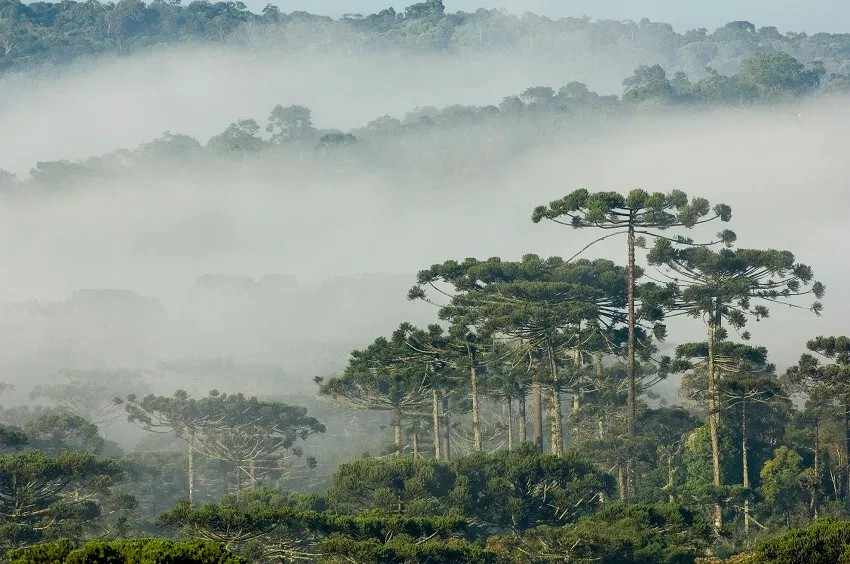
Araucaria forest in southern Brazil
This vignette demonstrates how to configure access credentials, download occurrence data from multiple sources, standardize and unify the results, and finally convert them into spatial objects ready for ecological analysis.
Overview of the functions:
-
set_specieslink_credentials(): stores your SpeciesLink API key in the R environment. -
set_gbif_credentials(): stores your GBIF credentials (username, email, and password) in the R environment. -
get_specieslink(): retrieves occurrence data from the SpeciesLink network using user-defined filters. -
prepare_gbif_download(): prepares the query data required for a robust GBIF download request. -
request_gbif(): submits an asynchronous request to download occurrence data from GBIF. -
import_gbif(): imports the dataset that has been processed and downloaded from GBIF using the request key generated byrequest_gbif(). -
get_bien(): downloads occurrence records from the Botanical Information and Ecology Network (BIEN) database. -
get_datapaper(): download occurrence records from published biodiversity data papers. -
cite_datapaper(): identifies the data sources present in the output ofget_datapaper()and prints the appropriate bibliographic citations. -
get_idigbio(): downloads species occurrence records from the iDigBio (Integrated Digitized Biocollections) database. -
format_columns(): formats and standardizes column names and data types of an occurrence dataset using a built-in template or a custom metadata object. -
create_metadata(): creates a custom metadata template that maps the column names of an external (non-standard) dataset to the package’s required standardized schema. -
bind_here(): combines multiple standardized occurrence data frames into a single dataset. -
spatialize(): converts the unified occurrence data frame into a SpatVector object.
Setting up credentials
Some databases require authentication to access their API. It is recommended to configure this before starting your downloads.
GBIF
To download data from GBIF using the asynchronous API, you must have an account an store your credentials (username, email, and password) in your R environment. You can find your GBIF username and the e-mail address associated with your account on the GBIF website (https://www.gbif.org/user/profile).
set_gbif_credentials(
  gbif_username = "your_username",
  gbif_email = "your_email@domain.com",
  gbif_password = "your_password",
  verbose = FALSE
)
SpeciesLink
To retrieve records from the SpeciesLink network, an API key is required. You can create and check your API key at: https://specieslink.net/aut/profile/apikeys.
set_specieslink_credentials(specieslink_key = "your_api_key", verbose = FALSE)Note: Only GBIF and SpeciesLink require credentials to be configured beforehand. The BIEN and iDigBio databases do not require API authentication for retrieving occurrence data.
Data acquisition
We will download occurrence data for Araucaria angustifolia as an example.
GBIF
To ensure access to large datasets, the GBIF download process is split into three steps: prepare, request, and import.
To download record from GBIF, we need to define a directory to save the files.
# Store downloads in a temporary directory
# In your own project, replace this with a permanent directory
output_dir <- file.path(tempdir(), "occ_data")
dir.create(output_dir)
# Prepare the taxonomic query
gbif_prep <- prepare_gbif_download(species = "Araucaria angustifolia")
The function returns a data.frame containing information
about the species in GBIF, including the total number of records, the
number of records with geographic coordinates (longitude and latitude),
the GBIF key (ID), and the taxonomic classification.
gbif_prep
#> with_coordinates n_records                species usageKey                          scientificName          canonicalName
#> 1             3056     15696 Araucaria angustifolia  2684940 Araucaria angustifolia (Bertol.) Kuntze Araucaria angustifolia
#>     rank   status confidence matchType kingdom       phylum   order        family     genus kingdomKey phylumKey classKey
#> 1 SPECIES ACCEPTED         97     EXACT Plantae Tracheophyta Pinales Araucariaceae Araucaria          6   7707728      194
#>   orderKey familyKey genusKey speciesKey     class          verbatim_name
#> 1      640      3924  2684910    2684940 Pinopsida Araucaria angustifolia
After confirming that the information is correct and that this is indeed the species for which we want to download records, we can use this object to request a download from GBIF. By default, the function retrieves only records with geographic coordinates and without spatial issues, but this can be modified.
The function also supports more complex download requests by allowing
predicates to be passed via the additional_predicates
argument. See help(rgbif::pred) for more details.
# Submit the request to GBIF
gbif_req <- request_gbif(
  gbif_info = gbif_prep,
  hasCoordinate = TRUE,      # Retrieve only records with coordinates
  hasGeospatialIssue = FALSE # Exclude records with geospatial issues
)
The request is processed by GBIF and may take several minutes to
complete (usually less than 15 minutes, but potentially several hours
depending on the number of occurrences). You can check the status of the
download using the rgbif package. Once the process is
complete, the following message is returned:
rgbif::occ_download_wait(gbif_req)
#> status: succeeded
#> download is done, status: succeeded
Now we can download the occurrence records and import them into R:
# Import the processed file
occ_gbif <- import_gbif(request_key = gbif_req)
#> Download file size: 2.04 MB
By default, the function imports the dataset with only the 25 columns
required by the other functions in the package. This behavior can be
changed by setting select_columns = FALSE or by explicitly
specifying the columns to import via the columns_to_import
argument.
head(occ_gbif)
#> # A tibble: 6 × 25
#>   scientificName                acceptedScientificName occurrenceID collectionCode catalogNumber decimalLongitude #> decimalLatitude
#>   <chr>                         <chr>                  <chr>        <chr>          <chr>                    <dbl>           #> <dbl>
#> 1 Araucaria angustifolia (Bert… Araucaria angustifoli… urn:catalog… ALTA-VP        74703                    -52.8          #> -26.4
#> 2 Araucaria angustifolia (Bert… Araucaria angustifoli… https://www… Observations   329390275                -49.2          #> -25.4
#> 3 Araucaria angustifolia (Bert… Araucaria angustifoli… https://www… Observations   329483122                -49.5          #> -28.0
#> 4 Araucaria angustifolia (Bert… Araucaria angustifoli… https://www… Observations   329455309                -74.0            #> 4.68
#> 5 Araucaria angustifolia (Bert… Araucaria angustifoli… https://www… Observations   329576016                -45.6          #> -22.7
#> 6 Araucaria angustifolia (Bert… Araucaria angustifoli… https://www… Observations   329805643                175.           #> -39.9
#> # ℹ 18 more variables: coordinateUncertaintyInMeters <dbl>, elevation <dbl>, continent <chr>, countryCode <chr>,
#> #   stateProvince <chr>, municipality <chr>, locality <chr>, verbatimLocality <chr>, year <int>, eventDate <chr>,
#> #   recordedBy <chr>, identifiedBy <chr>, basisOfRecord <chr>, occurrenceRemarks <chr>, habitat <chr>, datasetName <chr>,
#> #   datasetKey <chr>, speciesKey <int>
GBIF citation guidelines
Under the terms of the GBIF Data User Agreement, users who download individual datasets or search results and use them in research or policy are required to cite these data using a DOI.
In R, the easiest way to generate a citation for GBIF-mediated data
is with the rgbif::gbif_citation() function, which requires
only the request key:
rgbif::gbif_citation(gbif_req[1])
#> $download
#> [1] GBIF Occurrence Download https://doi.org/10.15468/dl.wdcvz4 Accessed from R via rgbif (https://github.com/ropensci/rgbif) on 2026-01-27"
#>
#> $datasets
#> NULL
SpeciesLink, BIEN, and iDigBio
GBIF is the most used database for obtaining occurrence records. However, unique records can be found in other databases. In the RuHere package, we implement functions for downloading records from 3 other databases:
- SpeciesLink: a large-scale biodiversity information portal created in Brazil. Most of the records found in SpeciesLink are also found in GBIF, but it also provide unique records.
- BIEN: occurrence records cleaned and standardized by the Botanical Information and Ecology Network.
- iDigBio: occurrence records cleaned and standardized by the Integrated Digitized Biocollections project.
These databases allow direct downloading through a single function call.
# SpeciesLink: Filtering by Species
occ_sl <- get_specieslink(species = "Araucaria angustifolia", verbose = FALSE)

# BIEN: Natives only, excluding cultivated records
occ_bien <- get_bien(species = "Araucaria angustifolia",
                     cultivated = FALSE,
                     natives.only = TRUE,
                     verbose = FALSE)
#> Getting page 1 of records

# iDigBio:
occ_idig <- get_idigbio(species = "Araucaria angustifolia")
Data papers
Data papers provide valuable, curated, and often unique occurrence
records that may not be available in global aggregators such as GBIF or
speciesLink (see the Discussion in Trindade
& Marques, 2024). The RuHere package provides
seamless access to several key biodiversity data papers and checklist
compilations across the Neotropical region:
- ATLANTIC: A series of data Papers from the Atlantic Forest Hotspot. It includes datapaper of amphibians, ants, bats, birds, butterflies, camtraps, epiphytes, flower-invertebrate interactions, frugivory, mammals, non-vollant mammals, pollination, primates and small mammals.
- DryFlor, a comprehensive dataset of the flora of neotropical dry forests across their full range.
- NeoTropTree, containing tree species checklist prepared for sites distributed across the Neotropical Biogeographic Region.
- Brazil Road-Kill, a data set of wildlife terrestrial vertebrate road-kills.
- Neotropical Xenarthrans: a data set of occurrence of xenarthran species in the Neotropics.
All records have been harmonized and standardized into the Darwin Core (DwC) format.
You can download and merge these datasets directly using the
get_datapaper() function by specifying the datasets of
interest. For example, to download both the Atlantic
and DryFlor compilations:
dp <- get_datapaper(datapaper = c("atlantic", "dryflor"))
#> Downloading data from atlantic datapapers...
#> Downloading data from DryFlor...
#> Datapaper(s) successfully retrieved.
#>
#> ##########################################################################
#>   PLEASE, USE THE FUNCTION cite_datapaper() TO CITE DATAPAPERS RETRIEVED
#> ##########################################################################

# Check the number of records retrieved per dataset
table(dp$data_source)
#> atlantic_amphibians                             atlantic_ants                             atlantic_bats
#>               15788                                    178976                                      9984
#>      atlantic_birds                      atlantic_butterflies              atlantic_camera_trap_mammals
#>               33391                                      7062                                     43068
#>    atlantic_camtrap                         atlantic_epiphyte atlantic_flower_invertebrate_interactions
#>                1820                                    121458                                     27225
#>  atlantic_frugivory                          atlantic_mammals                atlantic_nonvolant_mammals
#>               10374                                      4657                                      1046
#> atlantic_pollination                         atlantic_primates                     atlantic_small_mammal
#>                7524                                      2061                                      2620
#>             dryflor
#>               57180
By default, get_datapaper() retrieves all occurrence
records in the selected datasets. However, you can also filter records
for one or more target species using the species argument:
dp_araucaria <- get_datapaper(datapaper = c("atlantic", "dryflor"),
                              species = "Araucaria angustifolia")
#> Downloading data from atlantic datapapers...
#> Downloading data from DryFlor...
#> Datapaper(s) successfully retrieved.
#>
#> ##########################################################################
#>   PLEASE, USE THE FUNCTION cite_datapaper() TO CITE DATAPAPERS RETRIEVED
#> ##########################################################################

# Check the number of records retrieved per dataset
table(dp_araucaria$data_source)
#> atlantic_epiphyte           dryflor
#>              518                 1
Notice that the returned table now contains only the records of Araucaria angustifolia, which occurs in the DryFlor and Atlantic Epiphytes datasets.
Citing data papers
Properly citing the original data providers is essential for
recognizing their work and ensuring scientific reproducibility. The
cite_datapaper() function automatically inspects the
data_source column of your dataset and prints the complete bibliographic
references for all included sources:
cite_datapaper(data = dp_araucaria)
#> ===============================================================================
#>   PLEASE CITE THE FOLLOWING DATA PAPERS IN YOUR WORK:
#> ===============================================================================
#>
#> [1] Data Source: 'dryflor'
#> Dryflor, et al. (2016). Plant diversity patterns in neotropical dry forests and their conservation implications. Science, 353(6306), #> 1383-1387. https://doi.org/10.1126/science.aaf5080
#>
#> [2] Data Source: 'atlantic_epiphyte'
#> Ramos, F. N., Mortara, S. R., Monalisa-Francisco, N., Elias, J. P. C., Neto, L. M., Freitas, L., Kersten, R., Amorim, A. M., Matos, F. B., #> Nunes-Freitas, A. F., Alcantara, S., Alexandre, M. H. N., De Almeida-Scabbia, R. J., De Almeida, O. J. G., Alves, F. E., De Oliveira Alves, #> R. M., Alvim, F. S., De Andrade, A. C. S., De Andrade, S., ... Ribeiro, M. C. (2019). ATLANTIC EPIPHYTES: A data set of vascular and #> non-vascular epiphyte plants and lichens from the Atlantic Forest. Ecology, 100(2), e02541. https://doi.org/10.1002/ecy.2541
#>
#> -------------------------------------------------------------------------------
#> ATLANTIC Series Overview:
#> Data Papers from a biodiversity hotspot: https://esajournals.onlinelibrary.wiley.com/doi/toc/10.1002/(ISSN)1939-9170.AtlanticPapers
#> -------------------------------------------------------------------------------
Standardization and unification
At this stage, we have five occurrence datasets
(occ_gbif, occ_sl, occ_bien,
occ_idig, and dp_araucaria). We can merge
these datasets using the bind_here() function. However, we get an error
if we try to merge the raw datasets:
all_occ <- bind_here(occ_gbif, occ_sl, occ_bien, occ_idig, dp_araucaria)
#> Error: All datasets must have the same columns.
This occurs because each data source may provide datasets with
different column names (e.g., decimalLongitude
vs. longitude vs. long). Another common issue
involves column classes. For instance, date-related fields (such as
collection dates) may be stored as character vectors, numeric values, or
objects of class Date. Special characters can also cause
problems, as datasets with different text encodings may fail to bind
correctly.
All of these issues can be addressed using the
format_columns() function. This function applies metadata
templates to standardize column names and data types, ensuring that all
datasets are consistent and can be safely combined.
Standardizing columns (format_columns)
We apply the function to each dataset, specifying the source in the
metadata argument. This standardizes column names, extracts
clean binomials, and fixes data types.
# Standardizing GBIF
gbif_std <- format_columns(occ_gbif, metadata = "gbif")

# Standardizing SpeciesLink (checking for encoding issues)
sl_std <- format_columns(occ_sl, metadata = "specieslink", check_encoding = TRUE)
#> Warning: NAs introduced by coercion>

# Standardizing BIEN
bien_std <- format_columns(occ_bien, metadata = "bien")

# Standardizing iDigBio
idig_std <- format_columns(occ_idig, metadata = "idigbio")
You may sometimes encounter the warning
“NAs introduced by coercion”. This occurs when a column
that is expected to store numeric values (for example, a year) contains
data of another class (such as character strings) that cannot be
converted to numeric. In such cases, the incompatible values are
replaced with NA.
The occurrences retrieved with get_datapaper() have
already been standardized using the format_columns()
function.
Now, we can safelly bind the occurrences:
Customizing Metadata (create_metadata)
The functions above automatically standardize your data because the
package contains internal metadata templates (“presets”) for GBIF,
SpeciesLink, BIEN, and iDigBio. However, if you import occurrence data
from an external source (e.g., a local CSV file) with different column
names, you must first create a metadata template using
create_metadata(). This maps your original column names to
the package’s standardized schema.
The following example demonstrates how to handle data from an
external source, using occurrences of cougar (Puma concolor)
originally from the atlanticr R package (which is included
in RuHere for demonstration purposes).
In summary, the arguments must be filled with the names of the
columns in the occurrence dataset that are equivalent to the expected
fields. For example, in the example dataset, the
scientificName is stored in the
"actual_species_name" column, and the coordinates are
stored in the "longitude" and "latitude"
columns. These three columns are the only mandatory ones, but we
strongly recommend providing as many additional columns as possible in
order to take full advantage of the other functions in the package.
# Import data example
data("puma_atlanticr", package = "RuHere")

# Create metadata to standardize the occurrences
puma_metadata <- create_metadata(occ = puma_atlanticr,
                                 scientificName = "actual_species_name",
                                 decimalLongitude = "longitude",
                                 decimalLatitude = "latitude",
                                 elevation = "altitude",
                                 country = "country",
                                 stateProvince = "state",
                                 municipality = "municipality",
                                 locality = "study_location",
                                 year = "year_finish",
                                 habitat = "vegetation_type",
                                 datasetName = "reference")

# Now, we can use this metadata to standardize the columns
puma_occ <- format_columns(occ = puma_atlanticr, metadata = puma_metadata,
                           binomial_from = "actual_species_name",
                           data_source = "atlanticr")

head(puma_occ[, 1:5])
#>     record_id       species scientificName collectionCode catalogNumber
#> 1 atlanticr_1 Puma concolor  Puma concolor           <NA>          <NA>
#> 2 atlanticr_2 Puma concolor  Puma concolor           <NA>          <NA>
#> 3 atlanticr_3 Puma concolor  Puma concolor           <NA>          <NA>
#> 4 atlanticr_4 Puma concolor  Puma concolor           <NA>          <NA>
#> 5 atlanticr_5 Puma concolor  Puma concolor           <NA>          <NA>
#> 6 atlanticr_6 Puma concolor  Puma concolor           <NA>          <NA>
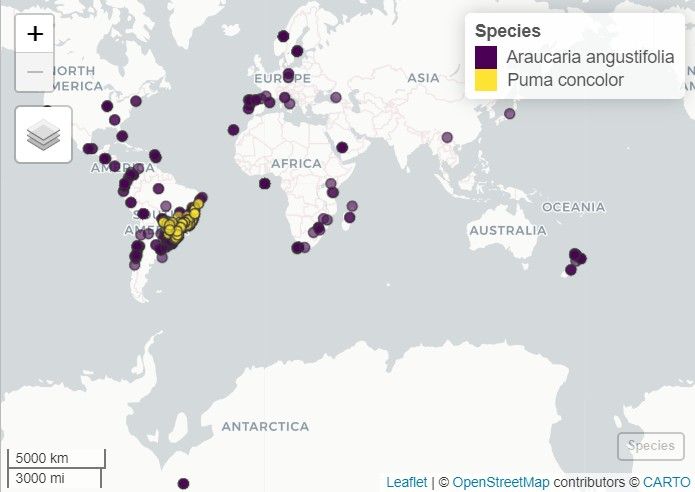
Even though this is an occurrence dataset from a different species, we can merge the cougar occurrences with those of Araucaria:
occ_araucaria_cougar <- bind_here(all_occ, #Occurrences of Araucaria
                                  puma_occ) #Occurrences of cougar
# Number of records per species
table(occ_araucaria_cougar$species)
#> Araucaria angustifolia          Puma concolor
#>                  6151                    139
The result is a robust dataset containing essential standardized columns such as species, decimalLongitude, decimalLatitude, and year.
Spatialization (spatialize)
To visualize the data on a map or perform geospatial operations, we
can convert the data frame into a SpatVector object. This
object can be plotted using the terra package
(terra::plot) or displayed in an interactive map using the
mapview package:
# Convert to spatial object
occ_spatial <- spatialize(occ = occ_araucaria_cougar)

# Load mapview
library(mapview)

# Plot the distribution using mapview
mapview(occ_spatial, zcol = "species", layer.name = "Species", cex = 4)